
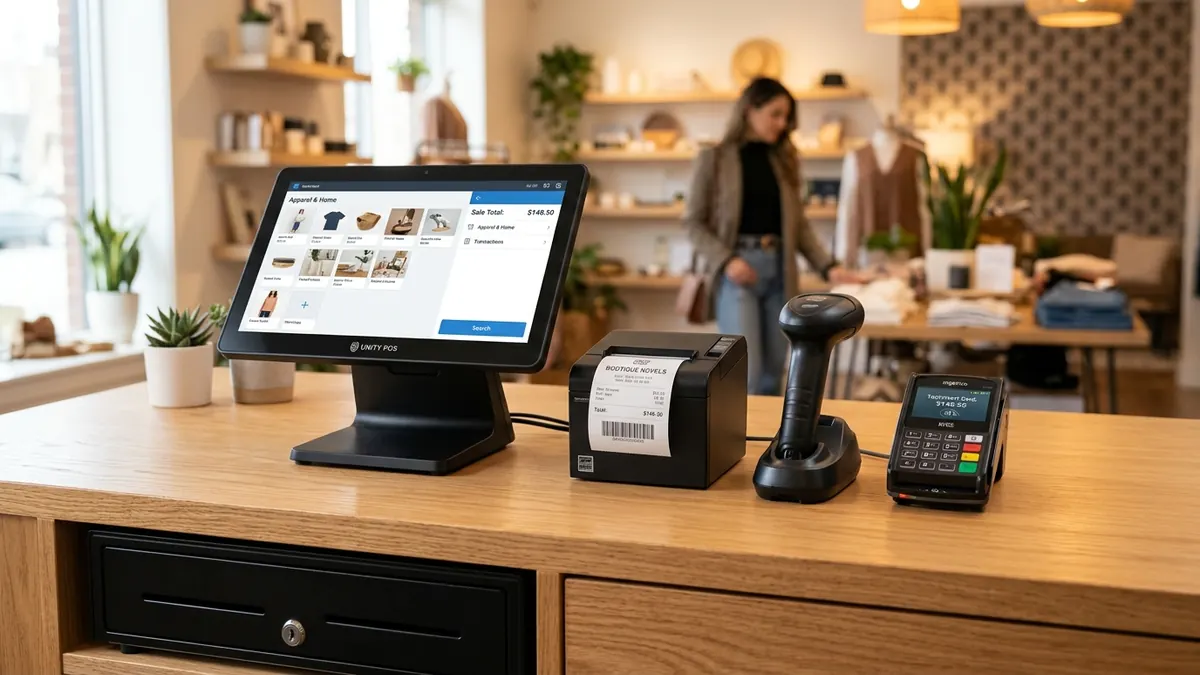
A Point of Sale (POS) system is the combination of software and hardware that allows a business to ring up sales, accept payments, track inventory, and issue receipts. In simple terms, it is the modern digital checkout counter where a customer exchanges money for your products or services.
Decades ago, a point of sale was nothing more than a mechanical cash register ringing up physical notes and coins. Today, a POS system serves as the central operating brain of a retail store, supermarket, restaurant, or service business. It bridges front-counter transactions with real-time stock balances, digital payments, customer loyalty accounts, and financial reporting.
Whether you are opening your first neighborhood grocery store or upgrading an established business from handwritten paper books and spreadsheets, understanding how a modern point of sale platform works is essential. At PopitCart (popitcart.com), we have built a powerful, intuitive POS ecosystem engineered specifically for modern retail and wholesale commerce.
The Two Halves of a POS System: Hardware vs. Software
Every complete point of sale setup consists of two interdependent elements working in harmony: physical equipment (hardware) and digital intelligence (software).
1. POS Hardware (The Physical Equipment)
POS hardware refers to the physical machines sitting on your sales counter that cashiers and customers interact with daily:
- POS Terminal / Display: The primary computer screen (touchscreen PC, desktop computer, or tablet) that displays product menus, pricing, and the checkout interface.
- Barcode Scanner: A handheld or hands-free laser/imager that scans product barcodes instantly, eliminating manual typing errors and line delays.
- Receipt Printer: A fast direct-thermal printer that produces clean, itemized customer receipts, tax invoices, or kitchen tickets without costly ink ribbons.
- Cash Drawer: A sturdy metal lockbox connected to the receipt printer that automatically pops open when a cash sale is completed.
- Customer Display Screen: A secondary monitor facing the customer that shows itemized pricing, order totals, and dynamic QR payment codes.
- Peripheral Accessories: Specialized additions such as digital weighing scales for bulk produce or electronic kitchen displays for restaurants.
2. POS Software (The Digital Operating System)
The software is the application powering the hardware. It manages everything happening behind the scenes:
- Counter Billing Engine: Calculates item subtotals, applies discounts or promotions, manages taxes, and prints branded invoices in seconds.
- Inventory & Stock Ledger: Automatically deducts sold items from stock balances in real time, preventing overselling and flagging low-stock alerts.
- Payment Processing: Reconciles diverse payment methods including cash, credit/debit cards, bank transfers, customer credit ledgers, and Central Bank-compliant LankaQR mobile payments.
- Analytics & Business Intelligence: Provides clear daily sales reports, profit margin analyses, best-selling item summaries, and cashier audit logs.
- Customer & Credit Management: Tracks customer purchase histories, loyalty reward points, and outstanding trade credit balances.
POS System vs. Traditional Cash Register: The Big Differences
Many first-time entrepreneurs ask: "Why should I invest in a POS system when a cheap electronic cash register can store cash and print a total?"
The difference lies in operational control, accuracy, and profitability. Here is how they compare:
| Feature / Capability | Traditional Cash Register | Modern Cloud/Hybrid POS |
|---|---|---|
| Inventory Tracking | None (Requires manual paper counts) | Real-Time Automatic Stock Deductions |
| Checkout Speed & Scanning | Manual key entry | High-speed 1D/2D Barcode Scanning |
| Pricing & Promo Updates | Tedious manual reprogramming | Instant Cloud Updates Across All Counters |
| Digital Payments & LankaQR | Cash only (External unlinked card swipe) | Integrated Cards, Split Bills & Dynamic LankaQR |
| Customer Credit ("Katha Potha") | Not Supported (Manual debt books) | Digital Credit Ledgers & Aging Reports |
| Remote Reporting | Must be physically present at register | Live Phone/Tablet Access from Anywhere |
How a Transaction Works: Step-by-Step
When you observe a cashier using PopitCart, an entire sequence of automated operations happens in less than three seconds:
- Item Lookup: The cashier scans a product barcode or taps a quick-key tile. The POS retrieves the exact description, current price, and applicable tax from its secure database. For guidance on setting up barcodes, review our barcode billing software guide.
- Cart Assembly: The cashier adjusts quantities, adds fractional weights (from connected weighing scales), or applies customer discounts.
- Payment Settlement: The customer chooses their preferred payment method. PopitCart prints dynamic LankaQR codes directly onto receipts or screens, allowing instant mobile banking settlements.
- Stock Deduction: The moment the bill completes, the system deducts the sold items from active inventory, updates daily profit summaries, and opens the cash drawer. Learn more about automated stock control in our inventory management system overview.
- Multi-Channel Sync: The sale synchronizes silently with your secure cloud back-office, allowing you to monitor sales revenue from your mobile phone wherever you are.
Five Proven Business Benefits of Implementing a POS System
1. Eliminate Human Errors and Cash Discrepancies
Manual cashier calculations often lead to forgotten items, wrong change, and pricing guesswork. With a barcode-enabled POS, prices are hardcoded, discounts are programmed, and change is calculated automatically, eliminating end-of-day register shortages.
2. Stop Mystery Stock Shrinkage
Without automated stock tracking, identifying lost or pilfered inventory is almost impossible. A POS records every single item sold, returned, or cancelled. You know precisely what should be sitting on your shelves down to the exact unit.
3. Accelerate Customer Checkout Speed
Long counter queues drive impatient shoppers away. Rapid barcode scanning, intuitive touchscreens, and quick payment processing cut transaction times by up to 70%, keeping checkout queues moving smoothly during peak trading hours.
4. Professional Customer Accounts and Credit Control
In retail and trade sectors across Sri Lanka, loyal regular customers and contractors frequently purchase on credit. Replacing vulnerable paper notebooks ("naya potha") with an integrated digital ledger prevents dispute arguments, forgotten debts, and cash flow leaks. For a deep dive, see our guide on customer credit management software.
5. Total Business Visibility From Anywhere
You no longer need to spend your evenings counting crumpled paper chits. PopitCart's cloud reports let you check hourly sales revenue, profit margins, top-performing staff, and fast-moving inventory live from your smartphone, laptop, or home tablet.
Why POS for Small Business in Sri Lanka is Essential
For independent shopkeepers and entrepreneurs, choosing the right pos for small business in sri lanka is the single most important operational upgrade. When researching pos systems for small business—frequently searched by local business owners as possystems or POS system Sri Lanka—the primary requirements are simplicity, speed, and real-time inventory control. Installing a dedicated retail pos for business ensures that walk-in checkouts move quickly, barcode prices stay accurate, and stock deductions happen automatically with every sale.
Furthermore, modern cloud based pos systems give small merchants mobile access to live revenue numbers, daily profit margins, and cashier cash drawer totals from anywhere. When evaluating the overall pos system price in sri lanka, affordable monthly subscription models make robust pos systems sri lanka accessible to startup groceries, boutique clothing shops, and mini-marts without large upfront software licensing burdens.
Why PopitCart is the Trusted Choice for Growing Businesses
PopitCart combines the elegance of modern cloud software with the reliability of industrial-grade engineering:
- True Hybrid Offline Reliability: Power cuts or broadband drops will never stop your business. PopitCart continues billing, scanning, and printing locally without internet, and syncs automatically when reconnected. Read more in our analysis on cloud POS vs offline POS systems.
- Central Bank Compliant LankaQR: Accept cashless payments directly from any banking app in Sri Lanka (BOC SmartPay, FriMi, ComBank Q+, Genie, Flash).
- Tailored for Every Industry: Specialized modules for retail shops, supermarkets, restaurants and bars, hair salons, hardware stores, and wholesale distribution warehouses.
- Affordable & Transparent Pricing: Software subscriptions starting at just Rs. 2,500 per month with zero hidden renewal fees.
Frequently Asked Questions (FAQ)
What does POS stand for?
POS stands for Point of Sale. It refers to the physical location or moment where a customer completes a transaction, pays for goods or services, and receives a receipt.
What is the main difference between a cash register and a POS system?
A traditional cash register only calculates totals and stores physical money. A modern POS system acts as an all-in-one business management platform that tracks inventory in real time, manages customer credit accounts, records sales analytics, and supports digital payments like cards and LankaQR.
How does a POS system work step-by-step?
First, the cashier scans an item barcode or selects a product on screen. The POS retrieves current prices and promotions from its database. Next, payment is accepted via cash, card, or QR. Finally, the system updates inventory, issues a receipt, and records the sale in back-office reports.
Can a POS system work without internet?
Yes, if it is built with hybrid offline capability. PopitCart continues billing, scanning barcodes, opening cash drawers, and printing receipts even when the internet drops. All offline transactions synchronize automatically once the connection is restored.
What hardware components are needed for a basic POS setup?
A standard POS setup includes a touchscreen computer or tablet (the terminal), an 80mm thermal receipt printer, a barcode scanner, and a metal cash drawer. Additional accessories include customer-facing displays, digital weighing scales, and wireless payment terminals.
How much does a POS system cost in Sri Lanka?
Software subscriptions generally start around Rs. 2,500 per month for small shops, while complete commercial hardware packages (including a POS computer, thermal printer, barcode scanner, and cash drawer) typically range between Rs. 80,000 and Rs. 150,000 depending on screen type and specifications.
How can I test PopitCart POS for my retail shop or restaurant?
You can book a free live demonstration by visiting the PopitCart contact page or calling 011 268 7645. The PopitCart team provides personalized walkthroughs tailored to retail stores, supermarkets, restaurants, salons, hardware shops, and wholesale distributors.
Get Started with Modern POS Technology Today
Upgrading to a modern POS system is one of the most profitable investments you can make for your business. It saves countless hours of manual bookkeeping, stops costly inventory shrinkage, and provides your customers with the swift, seamless checkout experience they deserve.
Ready to see how PopitCart can transform your sales counter? Call our helpful product specialists at 011 268 7645 or visit popitcart.com to book your free one-on-one live demo today.