Devices

Desktop Barcode Scanner in Sri Lanka for POS Billing

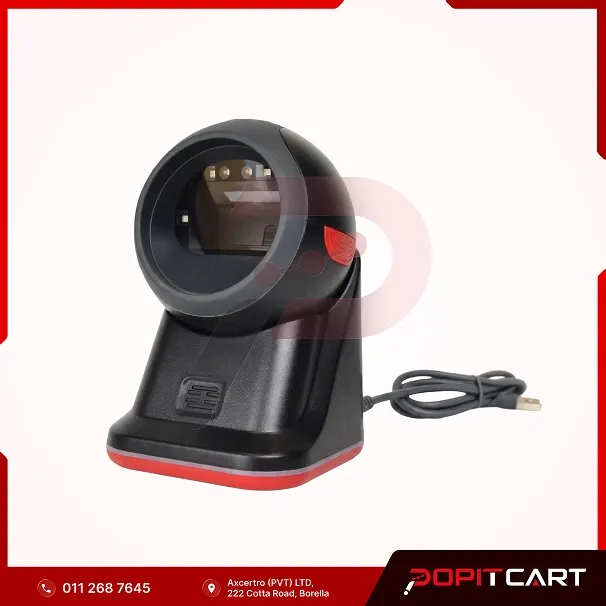
A Desktop Barcode Scanner for POS billing and retail checkout counters in Sri Lanka. Suitable for grocery shops, supermarkets, retail stores, hardware shops and general businesses looking for convenient product scanning with compatible POS software.

In stock

LKR 14,500.00 / one-time

When your shop gets busy, every second at the checkout counter matters. Customers are waiting, products need to be added to bills, and your cashier has to keep each transaction moving smoothly. Typing product codes manually can take extra time, especially when customers are purchasing several items. A Desktop Barcode Scanner makes this everyday task more convenient. Designed for POS checkout counters, this barcode scanner lets your cashier read product barcodes and enter product information into a compatible billing system. When the scanned barcode matches a product in your POS software, the system can identify the item and add it to the transaction. The desktop design makes it suitable for a dedicated cashier counter in grocery shops, supermarkets, minimarts, retail stores, hardware shops and other general businesses in Sri Lanka. It can also be used with supported inventory management applications for product identification and stock-related tasks. Whether you're opening a new retail shop, setting up a supermarket checkout counter or replacing an existing barcode reader, this Desktop Barcode Scanner is a practical addition to your POS hardware. Before purchasing, contact us to confirm the scanner's barcode format support, connection type, software compatibility, current price and warranty terms.

Best uses for desktop barcode scanner

  • Retail shops and general stores
  • Grocery shops and minimarts
  • Supermarkets and convenience stores
  • Hardware and building material stores
  • Wholesale shops and distribution counters
  • Clothing and fashion retail stores
  • Electronics and mobile accessory shops
  • Businesses setting up new POS checkout counters
  • Shops replacing existing barcode scanners

Desktop barcode scanner specifications

Product name
Desktop Barcode Scanner for POS Billing
Device type
Desktop Barcode Scanner
Product category
POS Barcode Scanners and Accessories
Main application
Barcode-based product identification
Installation position
Desktop or checkout counter
Scanning application
POS billing and supported inventory workflows
Suitable businesses
Retail shops, supermarkets, groceries and general businesses
Scanner design
Countertop scanner with base
Barcode formats
Confirm supported 1D/2D formats
POS software compatibility
Subject to scanner interface and application support
Package quantity
1 barcode scanner
Listed price
LKR 12,900
Availability
Available on request
Warranty
Confirm applicable terms

Capabilities

  • Read supported product barcodes during checkout
  • Add scanned products to bills through compatible POS software
  • Help reduce manual product code entry
  • Desktop design for dedicated cashier counters
  • Suitable for retail and supermarket checkout operations
  • Support barcode-based product identification
  • Can be used with compatible inventory management applications
  • Useful for everyday sales and stock-related workflows
  • Practical for new POS counter setups
  • Suitable for replacing existing barcode scanning equipment

Installation and training

Before setting up your desktop barcode scanner, confirm that it supports the barcode labels used by your business and can connect to your POS computer or billing device. Your products should also have the correct barcode information registered in the POS software so that scanned items can be identified during checkout. If you're introducing barcode billing for the first time, contact our team to discuss scanner setup, software compatibility, product barcode configuration and available staff guidance. Installation, configuration, training and any additional service charges will be confirmed in your quotation before purchase.

Support

Need help choosing a barcode scanner for your POS billing counter? Contact our team to discuss supported barcode types, connection requirements and compatibility with your existing POS equipment. Available technical assistance, troubleshooting and repair services depend on the supplied scanner model and the applicable service agreement. Please confirm the available support arrangements and any associated charges before ordering.

Warranty

Warranty coverage for this Desktop Barcode Scanner depends on the supplied hardware model and the applicable seller or manufacturer terms. Before purchasing, please confirm the warranty period, covered components, connection cable coverage, service procedures and any exclusions. Software compatibility and installation services may be subject to separate conditions. Request the complete product and warranty details with your quotation.

Frequently asked questions

Need more information about this product? Send us your question.

Ask about this product
What is a Desktop Barcode Scanner?

A Desktop Barcode Scanner is a device used to read product barcodes at retail checkout counters. When connected to compatible POS software, it helps cashiers identify products and add them to customer bills.

Is this Barcode Scanner suitable for supermarkets and grocery shops?

Yes. This desktop scanner is designed for checkout counters in supermarkets, grocery shops, minimarts, retail stores and other businesses that use product barcodes.

Can I use this scanner with a POS billing system?

The scanner can be used with compatible POS billing software. Before purchasing, confirm that its connection interface and supported barcode formats work with your selected system.

Can this Barcode Scanner be used for inventory management?

Yes, it may be used for barcode-based product identification in compatible inventory management software. Stock updates and other inventory functions depend on the application being used.

Does this scanner support QR codes and 2D barcodes?

Support for QR codes and 2D barcodes depends on the scanner's specifications. Please confirm the supported formats before purchasing.

Does this Barcode Scanner scan products automatically?

The scanning mode and available automatic detection features depend on the exact model. Please confirm whether it supports automatic or presentation-style scanning before ordering.

How much does a Desktop Barcode Scanner cost in Sri Lanka?

This Desktop Barcode Scanner is listed at LKR 12,900. Contact us to confirm the latest price, availability and any additional setup or delivery charges

Does the scanner include POS software?

No POS software licence is confirmed as part of this listing. The scanner is a hardware accessory, and compatible POS software can be discussed separately.

Can I connect the scanner to my existing computer?

Compatibility depends on the scanner's connection interface, your computer and the POS software. Please share your computer and software details so compatibility can be confirmed.

Does this Desktop Barcode Scanner come with a warranty?

Warranty coverage depends on the supplied model and applicable seller or manufacturer terms. Confirm the warranty period, covered components and service arrangements before purchase.

Related products

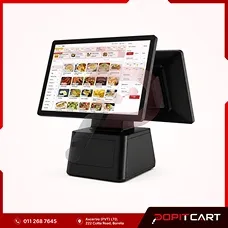
PopitCart Dual Screen Touch POS Computer

Devices

PopitCart Dual Screen Touch POS Computer

A dual-screen touchscreen POS computer for restaurants, retail shops, supermarkets and general businesses in Sri Lanka. Distributed under the PopitCart brand, it features an operator touchscreen and a customer-facing display for a more organised checkout experience.

View details
Wi-Fi Thermal POS Receipt Printer (USB + Wi-Fi)

Devices

Wi-Fi Thermal POS Receipt Printer (USB + Wi-Fi)

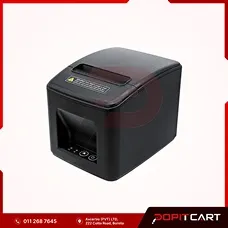
A Wi-Fi Thermal POS Receipt Printer with USB connectivity for retail shops, supermarkets, restaurants and general businesses in Sri Lanka. Print customer receipts using compatible POS billing software and enjoy flexible wired or wireless connection options.

View details

Before choosing desktop barcode scanner

Match it to your setup

List the types of barcodes on your products. Check that this scanner can read them. Ask how it connects to your POS computer and whether you need extra setup steps. Plan where it will sit on the counter and how staff will scan each item. Check the scan modes you need before you buy.

Check compatibility before ordering

Check how the device connects and which software it needs. Ask which extra parts you may need. Check the paper size for a printer, the needs of a scanner and how a cash drawer connects. Compare these with your current setup. A photo cannot tell you all these details. Ask about any missing facts and read the warranty and support terms before you buy.

Compare individual devices and bundles

For a new counter, compare separate devices with the parts listed in each POS bundle. Check the number of each part so you do not buy the same item twice. Look at the current price and stock status. For online orders to buy a POS system in Sri Lanka, check your cart and choose delivery or pickup at checkout.

PopitCart

Is this the right fit for your business?

Ask us about pricing and product details. Get a response on your WhatsApp number.

Desktop Barcode Scanner for POS Billing