Devices

Dual Screen Touch POS Computer in Sri Lanka

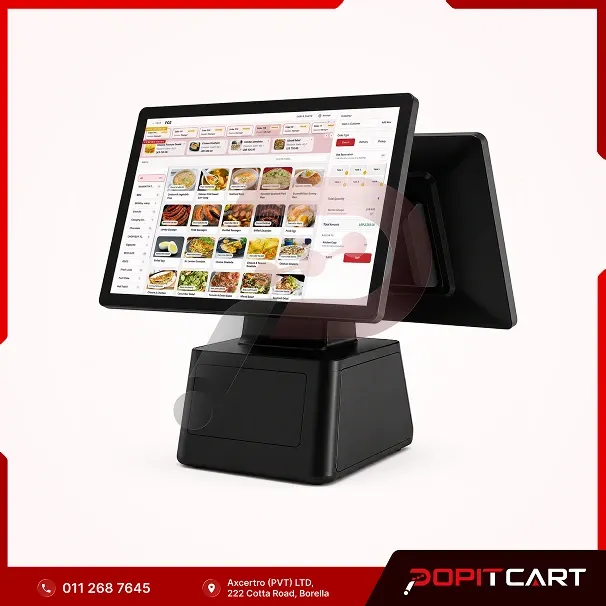
A dual-screen touchscreen POS computer for restaurants, retail shops, supermarkets and general businesses in Sri Lanka. Distributed under the PopitCart brand, it features an operator touchscreen and a customer-facing display for a more organised checkout experience.

In stock

LKR 135,000.00 / one-time

A busy checkout counter needs more than a basic computer. Your cashier needs a clear view of the billing screen, while customers appreciate being able to see information about their purchases. The PopitCart Dual Screen Touch POS Computer brings these two needs together in one checkout device. Distributed under the PopitCart brand in Sri Lanka, this dual-screen POS terminal features a touch-enabled operator display and a separate customer-facing screen. It provides a practical setup for businesses that want a dedicated billing station with a more organised customer checkout experience. Cashiers can use compatible POS software to select products, prepare bills and manage transactions on the main screen. Depending on the software configuration, the second display can show relevant customer information during checkout. This POS computer is suitable for restaurants, cafés, grocery shops, retail stores, supermarkets, hardware shops and other businesses that handle daily customer payments. Whether you're setting up your first POS counter or upgrading an existing billing system, PopitCart can help you check device specifications, software compatibility and suitable accessories before purchasing. Contact our team to confirm the available configuration, current price and warranty terms for this dual-screen POS computer in Sri Lanka.

Best uses for dual-screen POS computer

  • Restaurants and cafés
  • Grocery shops and minimarts
  • Retail shops and supermarkets
  • Hardware and general trading businesses
  • Takeaway and fast-food counters
  • Wholesale billing counters
  • Service business reception and payment counters
  • Businesses upgrading existing POS computers

Dual-screen POS computer specifications

Product name
PopitCart Dual Screen Touch POS Computer
Product type
Dual Screen Touchscreen POS Terminal
Brand
PopitCart
Display configuration
Operator display and customer-facing display
Main display
Touch-enabled POS screen
Secondary display
Customer-facing display
Suitable businesses
Restaurants, cafés, retail stores, supermarkets and general businesses
Software compatibility
Subject to the selected POS software and device configuration
Software licence
Confirm separately
Unit
1 POS computer
Listed price
LKR 135,000
Availability
Available on request

Capabilities

  • Dual-screen setup for cashier and customer-facing use
  • Touch-enabled main POS display for operator input
  • Dedicated customer-facing secondary display
  • Suitable for everyday POS billing and checkout operations
  • Supports compatible retail and restaurant POS software
  • Customer transaction information can be shown when supported by the software
  • Practical for new checkout counters and hardware upgrades
  • Can be configured with compatible POS peripherals after verification

Installation and training

Setting up a dual-screen POS computer starts with choosing the right hardware and software configuration for your business. Tell us about your billing counter, POS software, printer, barcode scanner and other equipment you plan to use. The PopitCart team can discuss the available installation and device configuration options. If you're purchasing PopitCart POS software, you can also ask about software setup and staff training for your checkout workflow. Installation, configuration, training and any additional charges will be confirmed in your quotation before purchase.

Support

Need help choosing or setting up your dual-screen POS computer? Contact PopitCart with questions about product specifications, software compatibility and suitable POS accessories. Technical support and servicing arrangements depend on the supplied device, selected software and applicable service agreement. Our team can explain the available support options and applicable conditions before you confirm your purchase.

Warranty

Warranty coverage for the PopitCart Dual Screen Touch POS Computer depends on the supplied hardware model and the applicable distributor or manufacturer warranty terms. Before ordering, please confirm the warranty period, covered components, service procedures and any exclusions. Software licences, additional accessories and installation services may have separate terms. Request the complete warranty and service details with your quotation.

Frequently asked questions

Need more information about this product? Send us your question.

Ask about this product
What is the PopitCart Dual Screen Touch POS Computer?

The PopitCart Dual Screen Touch POS Computer is a POS checkout device distributed under the PopitCart brand in Sri Lanka. It has an operator screen and a separate customer-facing display, making it suitable for business billing counters.

What is the benefit of a dual-screen POS computer?

A dual-screen POS computer provides separate displays for the cashier and customer. The cashier can manage billing on the main screen, while the second display can show customer-facing information when supported by the POS software.

Is this POS computer suitable for restaurants and retail shops?

Yes. It is suitable for restaurants, cafés, supermarkets, retail stores, grocery shops and other businesses that require a dedicated POS checkout counter. Software compatibility and hardware requirements should be checked before purchase.

Are both screens touch-enabled?

The computer features a touch-enabled operator display and a secondary screen. Please confirm the touch capabilities and technical specifications of each display with PopitCart before ordering.

Does this POS computer include PopitCart software?

This is a POS hardware product. PopitCart Retail POS and Restaurant POS software options can be discussed separately. Software inclusion, licence charges and compatibility will be confirmed in your quotation.

Can I connect a receipt printer, barcode scanner or cash drawer?

Compatible POS accessories may be used with the computer, depending on its available ports, operating system and software configuration. Contact PopitCart to confirm compatibility with your chosen devices.

How much does the Dual Screen POS Computer cost in Sri Lanka?

The currently listed price is LKR 135,000 per unit. Please contact PopitCart to confirm the latest price, availability, included accessories and any additional software or installation charges.

Does the computer come with a warranty?

Warranty terms depend on the supplied hardware configuration and applicable distributor or manufacturer conditions. Contact PopitCart for the warranty period and service coverage before purchasing.

Related products

Greentel A9 Pro Tablet

Devices

Greentel A9 Pro Tablet

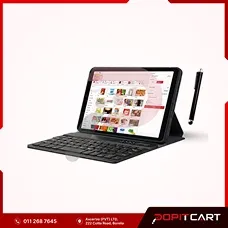
The Greentel A9 Pro is an affordable Android tablet in Sri Lanka with 4GB RAM, 64GB storage, a touchscreen display, keyboard and stylus pen. Ideal for everyday business tasks, data entry and compatible mobile POS applications in retail shops, restaurants and service businesses.

View details
Core i5 POS Desktop Computer Set

Devices

Core i5 POS Desktop Computer Set

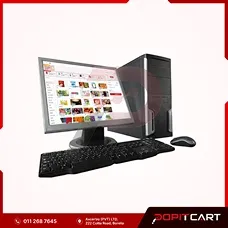
A Core i5 POS desktop computer set in Sri Lanka with 4GB RAM, 500GB storage, a 17-inch monitor, keyboard and mouse. A practical computer package for retail billing counters, grocery shops, restaurants, offices and general business use.

View details

Before choosing dual-screen POS computer

Match it to your setup

Check how your POS uses the staff screen and the screen for customers. Ask about screen sizes, touch controls and the operating system. Check the ports for printers and scanners. Plan the counter so each person can see the right screen. Ask which parts come with the computer. Do not rely on the photo alone.

Check compatibility before ordering

Check how the device connects and which software it needs. Ask which extra parts you may need. Check the paper size for a printer, the needs of a scanner and how a cash drawer connects. Compare these with your current setup. A photo cannot tell you all these details. Ask about any missing facts and read the warranty and support terms before you buy.

Compare individual devices and bundles

For a new counter, compare separate devices with the parts listed in each POS bundle. Check the number of each part so you do not buy the same item twice. Look at the current price and stock status. Use the enquiry form for items that need a quote. For online orders, check your cart and choose delivery or pickup at checkout.

PopitCart

Is this the right fit for your business?

Ask us about pricing and product details. Get a response on your WhatsApp number.

PopitCart Dual Screen Touch POS Computer