POS systems

Retail POS System in Sri Lanka for Shops & General Businesses

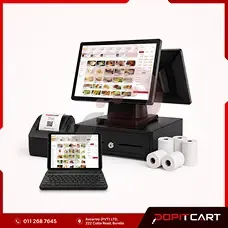
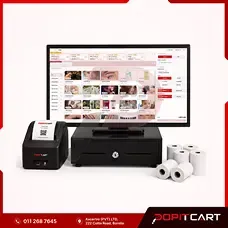
Make everyday billing and shop management easier with PopitCart Retail POS. Designed for grocery shops, retail stores, hardware shops, wholesale businesses and general trading businesses in Sri Lanka, it brings barcode billing, inventory management, customer records and sales reporting together in one system.

In stock

LKR 50,000.00 / one-time

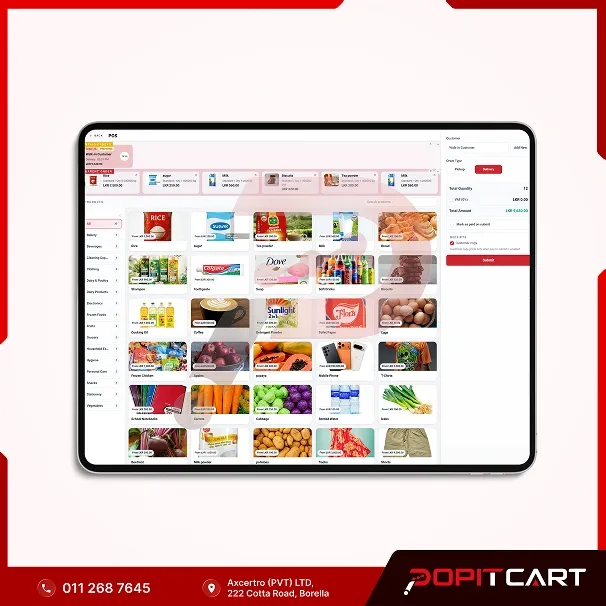
A busy day at your shop means customers waiting at the counter, products being sold, new stock arriving and plenty of small tasks that need your attention. When billing, stock records and sales information are handled separately, keeping everything up to date can take more time than it should. That's where PopitCart Retail POS can help. Built for retail shops and general trading businesses in Sri Lanka, PopitCart brings your daily billing, inventory management, customer information and sales reporting into one convenient system. At the checkout counter, you can scan product barcodes, add items to a bill, apply available discounts and record customer payments. Behind the counter, you can organise products, update prices, check stock levels and review sales activity. Whether you sell groceries, household items, hardware supplies, clothing, electronics or wholesale products, PopitCart helps you manage your products and everyday transactions more efficiently. As your business grows, you can explore additional features for staff management, reporting and multiple branches according to your selected software plan. From your first sale of the day to your final sales report, PopitCart Retail POS helps you spend less time on manual records and more time serving customers and growing your business.

Best uses for retail POS

  • Grocery shops and general stores
  • Retail shops and minimarts
  • Supermarkets and convenience stores
  • Hardware and building material shops
  • Wholesale shops and distribution counters
  • Clothing and fashion retail stores
  • Electronics and mobile accessory shops
  • Household goods and general merchandise stores
  • New businesses setting up a retail billing counter
  • Growing businesses with multiple sales counters

Retail POS specifications

System type
Retail POS and Business Management Software
Suitable businesses
Retail stores, grocery shops, hardware shops, wholesalers and general trading businesses
Billing
Barcode-based product billing and receipt printing
Product management
Product categories, prices, barcodes and product details
Inventory management
Stock levels, purchases and inventory movements
Supplier management
Supplier details and purchasing records
Customer management
Customer information and purchase history
Discounts
Item and bill discount options
Sales reporting
Daily sales, transaction history and product performance
Staff management
Staff accounts and access permissions
Hardware compatibility
Compatible barcode scanners, receipt printers and cash drawers
Offline functionality
Available through supported plans and applications
Multi-branch features
Subject to the selected software plan

Capabilities

  • Create customer bills quickly at the checkout counter
  • Scan product barcodes for faster billing
  • Organise products by categories and selling prices
  • Track available stock and inventory movements
  • Manage suppliers and product purchasing records
  • Apply available discounts during customer billing
  • Maintain customer details and purchase history
  • Record sales and supported payment methods
  • Review daily sales and product performance reports
  • Monitor low-stock products and replenishment needs
  • Manage staff accounts and access permissions
  • Explore multi-branch inventory and reporting options based on the selected plan

Installation and training

Every retail business works a little differently. A grocery shop may need fast barcode billing, while a hardware store or wholesale business may have different product and inventory requirements. Tell us about your business, product categories, billing counters, staff and stock management process. The PopitCart team can discuss a suitable system configuration, product data setup and staff training options. Whether you're introducing a POS system for the first time or replacing existing billing software, we can help you understand the available setup and implementation services. Software configuration, data setup, compatible hardware installation, training and any additional charges will be confirmed in your quotation before implementation.

Support

Need help using PopitCart Retail POS? Our team can assist with questions about daily billing, product management, inventory, customer records and other system operations. Available technical support, contact methods, service hours and maintenance arrangements depend on your selected software plan and service agreement. Contact PopitCart to learn more about the support options available for your retail business.

Warranty

Before choosing your PopitCart Retail POS package, make sure you understand the software features and services included. Software access, licence duration, updates, maintenance, technical support and any recurring or renewal charges depend on the selected package and service agreement. If you purchase POS hardware separately or as part of a bundle, the applicable warranty period and conditions for each device will be confirmed in your quotation. Contact our team for a clear explanation of the software licence, support arrangements and warranty terms before placing your order.

Frequently asked questions

Need more information about this product? Send us your question.

Ask about this product
What is PopitCart Retail POS?

PopitCart Retail POS is billing, inventory and business management software designed for retail shops and general trading businesses in Sri Lanka. It helps businesses manage product sales, barcodes, stock, customer information and daily reports from one system.

Is PopitCart suitable for grocery shops and supermarkets?

Yes. PopitCart Retail POS is suitable for grocery shops, minimarts, supermarkets and other retail businesses. It supports barcode billing, product management and stock tracking to help organise daily checkout operations.

Can general businesses use PopitCart Retail POS?

Yes. The system is designed for different types of businesses that sell physical products, including general stores, hardware shops, clothing stores, electronics retailers and wholesale businesses. The appropriate configuration depends on your products and sales process.

Does PopitCart support barcode scanning and receipt printing?

Yes. You can use compatible barcode scanners to add products during checkout and supported receipt printers to print customer bills. Hardware compatibility should be confirmed before purchasing equipment.

Can I manage inventory and track stock levels?

Yes. PopitCart provides inventory management features for maintaining product information, checking stock levels and reviewing inventory movements. Available purchasing, supplier and reporting features depend on the software configuration.

Can I use PopitCart for hardware and wholesale businesses?

PopitCart can support general product billing and inventory workflows for hardware stores and wholesalers. If your business requires specialised units of measurement, bulk pricing or customer credit arrangements, discuss those requirements during a demonstration.

Does PopitCart Retail POS work without internet access?

Offline functionality is available through supported PopitCart plans and applications. The browser-based and offline application features differ by plan, so confirm the offline setup and synchronisation requirements before purchasing.

Can I manage multiple shops or branches?

PopitCart offers multi-branch management options for growing retail businesses. The available branch, stock and reporting features depend on the selected software plan.

How much does a retail POS system cost in Sri Lanka?

PopitCart offers different software plans and setup options. Your total cost depends on the selected software package, installation, hardware and any recurring charges. Contact PopitCart for an up-to-date quotation with all costs clearly explained.

Does the Retail POS software include a POS computer and barcode scanner?

The standalone Retail POS software product is separate from the hardware bundle. If you need a complete checkout setup, ask about the PopitCart Retail POS Bundle, which combines compatible software with selected POS equipment.

Can I request a demonstration before buying?

Yes. Contact PopitCart to request a Retail POS demonstration. Tell us about your shop, product range, checkout counters and inventory requirements so we can discuss a suitable setup.

Related products

Service POS System in Sri Lanka - APO POS Bundle

Bundles

Service POS System in Sri Lanka - APO POS Bundle

A practical Service Business POS System Bundle for salons, spas, beauty studios, barbershops and doctor channeling centres in Sri Lanka. Set up a professional reception and billing counter with essential POS equipment for daily service payments and receipt printing.

View details
PopitCart Dual Screen Touch POS Computer

Devices

PopitCart Dual Screen Touch POS Computer

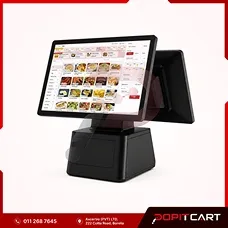
A dual-screen touchscreen POS computer for restaurants, retail shops, supermarkets and general businesses in Sri Lanka. Distributed under the PopitCart brand, it features an operator touchscreen and a customer-facing display for a more organised checkout experience.

View details
Greentel A9 Pro Tablet

Devices

Greentel A9 Pro Tablet

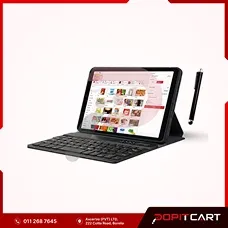
The Greentel A9 Pro is an affordable Android tablet in Sri Lanka with 4GB RAM, 64GB storage, a touchscreen display, keyboard and stylus pen. Ideal for everyday business tasks, data entry and compatible mobile POS applications in retail shops, restaurants and service businesses.

View details

Before choosing retail POS

Match it to your setup

Start with the tasks your team does each day. Shops, restaurants and salons have different needs for billing, stock and services. Read each product page to see its features and choices. Make a list of the jobs you need it to handle. Use that list when you ask us about the system.

Check the setup you need

List the computer or tablet, printer, scanner and other devices you plan to use. Ask PopitCart which ones work with your current setup. Each system may need different devices. Check the product page for setup, training and support details. If a feature you need is not listed, ask us before you order.

Review the billing option

Check whether you pay each month, each year or once for the software. Compare prices for the same length of time. Confirm what each choice includes. We list devices and bundles in their own groups, so check those too when you plan a full setup. Use the enquiry form if you need a quote. For items you can buy online, check your cart before checkout.

PopitCart

Is this the right fit for your business?

Ask us about pricing and product details. Get a response on your WhatsApp number.

PopitCart Retail POS System