
POS systems
Restaurant POS Software in Sri Lanka for Orders & Billing
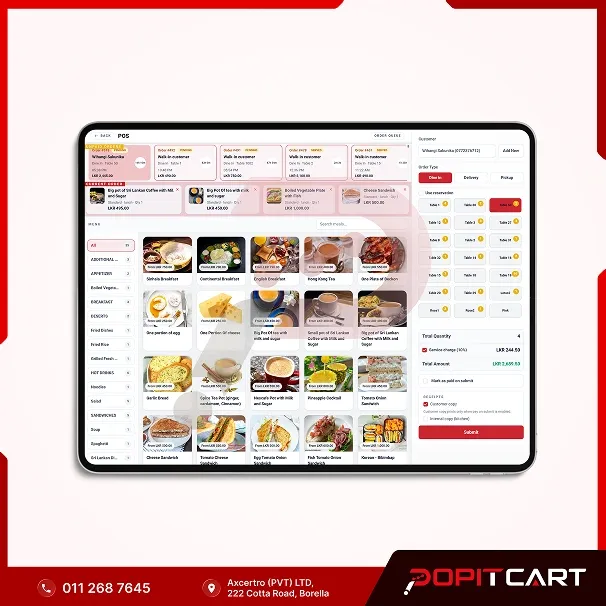
Make restaurant billing, order management and daily operations easier with PopitCart Restaurant POS. Designed for restaurants, cafés and takeaway businesses in Sri Lanka, it helps manage customer orders, tables, kitchen activities, inventory and sales from one system.
In stock
LKR 50,000.00 / one-time
When your restaurant gets busy, keeping everything organised can be a challenge. Customers are placing orders, waiters are checking tables, the kitchen is preparing meals, and your cashier needs to handle payments without delays. When these activities are managed separately, it's easy for information to get mixed up. PopitCart Restaurant POS helps bring your restaurant's daily operations together. Designed for food businesses in Sri Lanka, our restaurant management software makes it easier to handle dine-in, takeaway and delivery orders, organise tables, manage menu items and prepare customer bills. Your staff can record orders and share the relevant details with the kitchen through the available kitchen order workflow. At the checkout counter, you can prepare bills, record payments and print receipts using compatible POS printers. PopitCart also helps you monitor ingredient stock, review daily sales and understand which menu items are popular with your customers. Whether you run a small café, family restaurant, fast-food outlet or busy takeaway business, PopitCart Restaurant POS helps your team stay organised so you can focus on serving customers and growing your business.
Best uses for restaurant POS
- Restaurants with dine-in and table service
- Cafés and coffee shops
- Takeaway restaurants and food outlets
- Fast-food restaurants and snack bars
- Bakeries with food-service counters
- Restaurants managing their own delivery orders
- Small and medium-sized food businesses
Restaurant POS specifications
- System type
- Restaurant POS and Management Software
- Suitable businesses
- Restaurants, cafés, takeaway outlets and food businesses
- Order types
- Dine-in, Takeaway and Delivery
- Menu management
- Categories, food items, variations and pricing
- Table management
- Restaurant tables and associated dine-in orders
- Kitchen management
- Kitchen order printing and preparation tracking
- Billing
- Customer bills, payments and receipt printing
- Inventory
- Ingredient stock and inventory movement tracking
- Sales reporting
- Daily sales, order history and popular menu items
- User management
- Staff accounts and role-based access
- Software pricing
- Contact PopitCart for package details
Capabilities
- Manage dine-in, takeaway and delivery orders
- Create restaurant bills and print customer receipts
- Organise menu categories, food items and prices
- Manage restaurant tables and their associated orders
- Send order details to the kitchen through the kitchen order workflow
- Track customer orders and their preparation status
- Record customer payments and review order history
- Manage ingredient stock and inventory movements
- Review daily sales and popular menu items
- Manage staff access based on assigned user roles
Installation and training
Every restaurant has its own way of handling orders, preparing food and serving customers. That's why choosing the right POS configuration is important. Tell us about your restaurant's menu, table arrangement, ordering process, billing counters and kitchen printing requirements. The PopitCart team can discuss the software setup and training options that suit your business. Whether you're introducing a restaurant POS system for the first time or moving from an existing billing process, we can help you understand the available setup options. System configuration, menu setup, POS device installation, staff training and any additional charges will be confirmed in your quotation before implementation.
Support
Need help using PopitCart Restaurant POS? Contact our team with questions about restaurant billing, order management, menu setup, kitchen workflows and everyday system operations. Available technical support, contact methods, service hours and maintenance arrangements depend on your selected software package and service agreement. Contact PopitCart to learn about the support options available for your restaurant.
Warranty
Before purchasing PopitCart Restaurant POS, make sure you understand what is included in your selected package. Software access, licence duration, maintenance, updates, technical support and any renewal or recurring charges are determined by the selected package and service agreement. If you purchase POS hardware with the software, warranty periods and coverage for each device will be confirmed separately. Contact our team for a clear explanation of the software licence, support arrangements and hardware warranty terms before placing your order.
PopitCart
Is this the right fit for your business?
Ask us about pricing and product details. Get a response on your WhatsApp number.
PopitCart Restaurant POS System